TABLE OF CONTENTS
- Introduction
- Run and export a NAPLAN report
- Current (Export current Year 3, 5, 7 & 9)
- Next academic Year (Next Year 3 projection)
- Configuring Zunia for your state’s NAPLAN submission
Introduction
Australian schools are required to report NAPLAN Students to the Australian Curriculum, Assessment Reporting Authority (ACARA) by state.
The NAPLAN Compliance report will export projected listings of all students in years 3, 5, 7 and 9 registered for the NAPLAN program.
This step-by-step guide will help you to set up and run the NAPLAN report. When the report is run, Zunia will identify errors and warnings so you can configure any compulsory and relevant Zunia fields to map to the right NAPLAN requirements.
When all the mandatory fields are mapping correctly, the export file will be available to be downloaded and submitted to ACARA.
Run and export a NAPLAN report
To run the NAPLAN Export, go to Reporting and Compliance > Compliance Reports;
- Select your state in the STATE field.
- Select the NAPLAN report for you state.
- Select View Data Mapping and ensure all relevant fields are mapped to precise ACARA fields.
- Select Export.
- Add/Remove Campus parameters.
- Select the applicable School Sector, whether your school is independent, Catholic or government.
- Select Export.
- When the export is done, a downloadable Errors and Warning list will be available.
- Refer to the table for your state’s NAPLAN submission to configure each of the errors and determine whether the warnings need to be addressed.
- When all errors have been resolved the export file will be available for download and submission.
There are 2 modes of running the NAPLAN Export
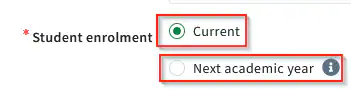
Current (Export current Year 3, 5, 7 & 9)
The Current Year export is performed early in the New year when the government requests Year 3, 5, 7, 9 registration data for the current academic year including :
- Student Current timeline is for Year 3, 5, 7 or 9
Next academic Year (Next Year 3 projection)
Important : The next Academic Year must be created to run this export
The Next Academic Year Projection export is typically performed late in the current year when the government requests Year 3 registration data for the next academic year, i.e.: Current Year 2 students data including :
- All students projected to be in Year 3 in the next academic school year
Configuring Zunia for your state’s NAPLAN submission
Find the right troubleshooting guide for your state:
Was this article helpful?
That’s Great!
Thank you for your feedback
Sorry! We couldn't be helpful
Thank you for your feedback
Feedback sent
We appreciate your effort and will try to fix the article