TABLE OF CONTENTS
Introduction
The Zunia Email and SMS service provides an integrated communication solution to allow schools to quickly and efficiently engage with the whole school community. It is is designed to allow schools to improve communications with parents, staff and students. Allowing custom messages to individuals, groups or the entire school in seconds.
- Non Attendance
- School excursions
- Events
- Alerts
- Weather cancellations
- School APP Registration
- Emergency Shutdown or evacuation
Clients who would like to utilize the SMS service will need to execute an SMS Agreement through engagement with their Customer Success Manager (CSM).
Email and SMS from Zunia can be submitted individually or in bulk from the following locations :
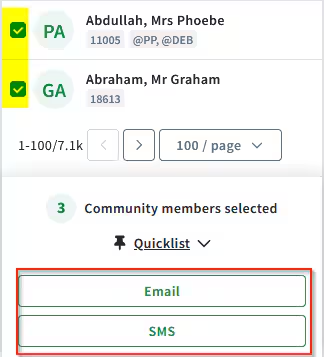
Any of the profile menus (Community Profile, Student Profile(Past, current and Future), Staff Profile, User setup)
Select the required recipients, then Email or SMS
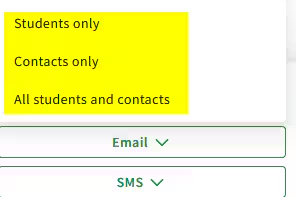
In Student Profile either student, student contact or both can be emailed or SMS'ed
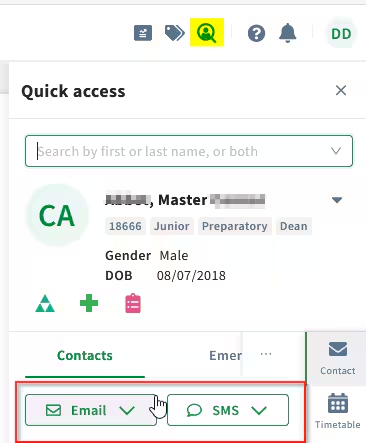
Student Quick Access Panel (QAP)
Select Email or SMS after searching for a student
Students or Student contacts can be sent an email or SMS
Any Email from Zunia is stored in the Community Member Correspondence menu. Emails can be 2 way however there are some limitations.
SMS
Any SMS from Zunia is stored in the Community Member Correspondence menu. An SMS reply will not be received in Zunia so it is important to advise recipients to not reply to an SMS but to contact the school an alternate way..
| Zunia Action | Email/SMS Logging result |
| Initial Email from Zunia | Email is sent to Recipients Email Service provider (Outlook, Gmail..etc) Email is stored in the Recipients Correspondence Log |
| Recipient replies via their Email provider | Reply is received and stored in the Recipients Correspondence Log in Zunia |
| Initial SMS from Zunia | SMS is sent to Recipients Phone Service provider and subsequently their mobile device SMS is stored in the Recipients Correspondence Log |
| Recipient replies via their Mobile device | Reply is not received nor stored in the Recipients Correspondence Log. |
Email and SMS Configuration
Select System Configuration -> General -> Email
| Default Classification | The default security classification assigned to the outgoing Email. Users will require security access to this classification to see the email in the Community Correspondence Log |
| File Attachments | Select to allow files to be attached to emails |
| Maximum Attachment Size | Set the maximum size(in KB) an attachment can be else size is unlimited. |
| School Footer Enabled | This is an additional footer to any footer attached at your email exchange server |
| School Footer message | The footer message attached to the email |
| Auto Spell check | Select to enable spell check capability |
| Send Email to students | Enable to allow students to be added as email recipients |
| Send Email to staff | Enable to allow staff to be added as email recipients |
| Send Email to parents | Enable to allow parents to be added as email recipients |
Select System Configuration -> General -> SMS
| Default Classification | The default security classification assigned to the outgoing SMS. Users will require security access to this classification to see the SMS in the Community Correspondence Log |
| Enforce maximum SMS character limit | Enable to set a maximum SMS character count |
| Maximum sms character limit | Maximum SMS character limit per SMS. If using merge fields then this limit will be overridden |
| School Footer Enabled | Enable to add an SMS footer message |
| School Footer message | The footer message attached to the SMS. Adding a 'Do Not Reply' footer will warn recipients as replies will not be received |
| Auto Spell check | Select to enable spell check capability |
| Send SMS to students | Enable to allow students to be added as SMS recipients |
| Send SMS to staff | Enable to allow staff to be added as SMS recipients |
| Send SMS to parents | Enable to allow parents to be added as SMS recipients |
Email or SMS a Quick list
You can create a custom list of community members to Email or SMS - Send emails and SMS to a custom list
Was this article helpful?
That’s Great!
Thank you for your feedback
Sorry! We couldn't be helpful
Thank you for your feedback
Feedback sent
We appreciate your effort and will try to fix the article