TABLE OF CONTENTS
Email templates are useful for emails which are sent frequently or need specific formatting, information or phrasing.
Mail Merge Fields can be used to automatically fill in personalized data such as name, address, dates, student, staff or community data.
You can use mail merge fields to personalize an individual or group email eg, if you are sending a group email to parents whose students have unexplained absences, the email appears as addressed to each parent individually, and refers to their son or daughter by name.
You can send a bulk email to all staff or a group of community members using a template and merge fields to address them by title, first name, last name
A template can also contain a school logo or signiature
Mail Merge Fields
Adding a mail merge field to an email or SMS
To add a merge field to an email or SMS when in Compose Email Mode:
- Place the cursor in the position you want the merge field to appear.
- Select from the MailMerge drop down box the merge field you want to display.
Email Templates
Creating a Template
Select System Configuration -> Email Templates
You can define the default email classification code and the email body content
| Column | Description |
| Name | Name of the email/SMS template |
| Description | Description of the email/SMS template |
| Classification | Default classification code of the email template |
| Subject | Subject line for the message template (Subject line can be modified) |
| Merge Mail Context | The maintenance area the template can apply to. Refer below table for more details |
| Insert Merge Field | When creating the template, select the required merge field |
Email Templates and Mail Merge Context.
Some Email templates are only applicable to the relevant maintenance area.
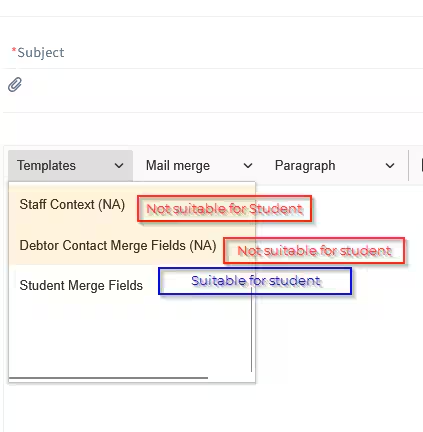
When selecting a template for a particular maintenance area, only use templates without the (NA) suffix as there is a risk of sending missing mail merge data.
This example email originates in Student Profile. All possible templates are selectable however only the template containing Student mail merge fields should be used.
This table defines how Mail Merge context relates to email template usage in each area.
| Mail Merge Context | Description and Template Usage | Other information |
| Student Maintenance | Used for Sending emails to students via Current Student profile Classes -> Email/SMS Students Quick Access Panel -> Email/SMS Student | Unique mail merge fields include current student information such as student campus, year level, house ... etc |
| Staff Maintenance | Used for Sending emails to Staff members via Staff Profile | Unique mail merge fields include staff information such as staff code, staff campus, staff year level...etc |
| Future Student maintenance | Used for Sending emails to students via Future student profile | Unique mail merge fields include future student information such as application and enrol year fields |
| Past Student Maintenance | Used for Sending emails to students via Past student profile | Unique mail merge fields include past student information such as peer year |
| Community Maintenance | Used for Sending emails to Community members via Community Profile | Unique mail merge fields include spouse information
|
| Student Contacts Maintenance | Used for Sending emails to students and Parents(Contacts) via Current Student profile Classes -> Email/SMS Contacts only Classes -> Email/SMS All students and contacts Quick Access Panel -> Email/SMS Contacts | Can address both the student and the student contact Unique mail merge fields include current student information such as student campus, year level, house ... etc Student - use Student Preferred Name Contact - use Contact Preferred Name |
| Future Student Contacts Maintenance | Used for Sending emails to students and Parents(Contacts) via Future student profile | Can address both the Future student and the Future contact Unique mail merge fields include future student information such as application and enrol year fields Future Student - use Student Preferred Name Future contact - use Contact Preferred Name |
| Past Student Contacts Maintenance | Used for Sending emails to students and Parents(Contacts) via Past student profile | Can address both the Past student and the Past contact Unique mail merge fields include past student information such as peer year Past Student - use Student Preferred Name Past contact - use Contact Preferred Name |
| Debtor Contact Maintenance | Used for Sending emails/SMS's to Debtor accounts Debtor Statements -> Select Debtor Account ->Email Invoices and credits -> select invoice -> Email | Unique mail merge fields include Account Name, Balance, Overdue amounts, Statement and Payment Plan details. |
Was this article helpful?
That’s Great!
Thank you for your feedback
Sorry! We couldn't be helpful
Thank you for your feedback
Feedback sent
We appreciate your effort and will try to fix the article