TABLE OF CONTENTS
Introduction
When a student submits their school application, your school may have created a profile for them in Future students (also known as new starters). This can be well before the student’s expected start date.
If you have a group of new starters about to start at your school, you can create a Bulk transfer to transfer their profiles from Future student profiles to Current student profiles.
Future new starters to current students checklist
To transfer future students to current students, go to Student profiles > Rollover & bulk student transfer:
- Select Add transfer, then select New starters.
- Under Add new starters transfer, fill in the transfer details.
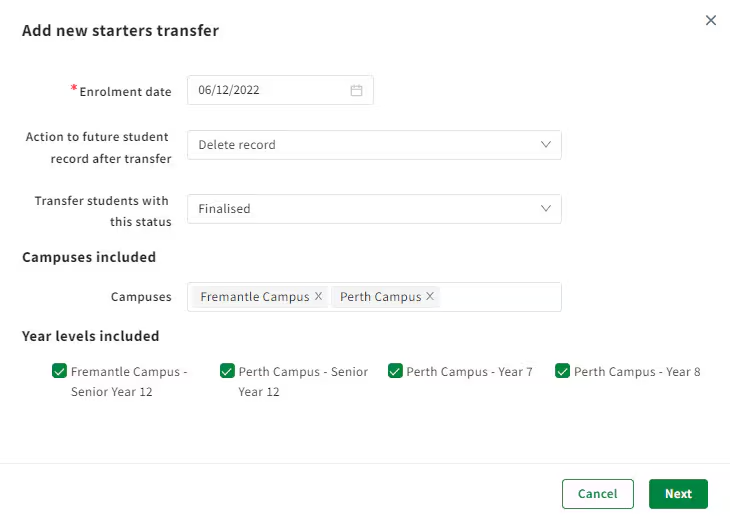
- Enrolment date: Date to enrol students from after transfer.
- Action to future student record after transfer: If you want to keep the future student profiles and create new current student profiles, select Keep record. Otherwise, select Delete record. E.g. 'Delete record’ will remove ‘future student’ status from related students profiles.
- Transfer students with this status: Select the application status of the students you're transferring.
- Campuses: Select the campuses you want to include in the transfer.
- Year levels included: Select the year levels you want to include in the transfer.
- When you're done, select Next.
3. Review and Approve bulk student transfer.
To complete the transfer process, you need to review and approve the details.
- To see a summary of the New starters transfer details, select View report. It can take a few minutes, but you’ll see a new Notification via the bell icon
 when it’s ready.
 - If you’ve made a mistake, you can revert a student rollover to undo these changes.
- Once you’ve confirmed the transfer numbers are correct, select the transfer you want to approve and then Approve transfer.
You’ve bulk transferred future new starters to current students.
Was this article helpful?
That’s Great!
Thank you for your feedback
Sorry! We couldn't be helpful
Thank you for your feedback
Feedback sent
We appreciate your effort and will try to fix the article