Introduction
When you add term dates to your timetable, you're applying the timetable cycle you've created to an academic period (term).
Add term dates
To add term dates to your timetable, go to Set up timetable > Teaching and non-teaching days.
1. Select the timetable you want to add term dates to.
2. Select Add from the terms panel.
3. You can now fill in the term details.
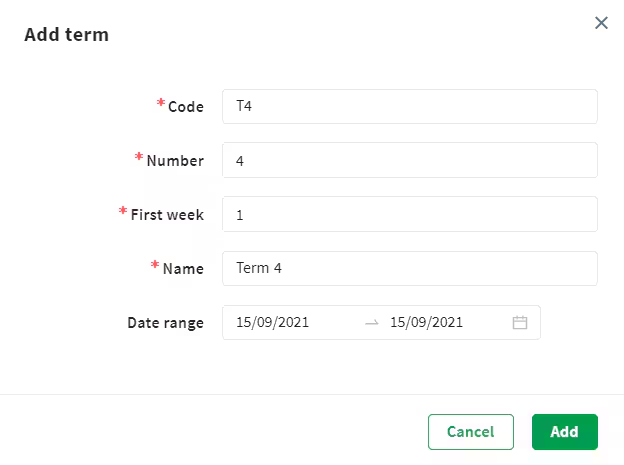
- Code: This could be T1 or Term1, for example.
- Number: the number of the term, for example, 1.
- First week: this would usually be '1'.
- Name: this could be Term 1 or T1 2021, for example.
- Date range: term start and end dates.
4. Select Add when you're done.
Note: Repeat these steps to add all your terms to the timetable.
Was this article helpful?
That’s Great!
Thank you for your feedback
Sorry! We couldn't be helpful
Thank you for your feedback
Feedback sent
We appreciate your effort and will try to fix the article