TABLE OF CONTENTS
Introduction
SEQTA-Zunia integration combines our core student information system with our world leading student learning and wellbeing platform to provide schools with the most comprehensive school management and learning tools available. Together they provide the complete end-to-end solution for school operations, compliance reporting, fees and billing to complete attendance, wellbeing and learning management.
This guide will show you how the integration works, explain how the data flows between SEQTA and Zunia and help you understand where different tasks get done in each platform with links to guides to help you complete them.
How does the SEQTA-Zunia integration work?
At its core the integration is a one-way flow of student, staff and community data from Zunia to SEQTA.
Depending on the customised scheme for your school, there will be sync and contact rules that apply to what information is imported and how it is flagged in SEQTA.
You can reach out to your System Administrator if you have questions about your school’s scheme.
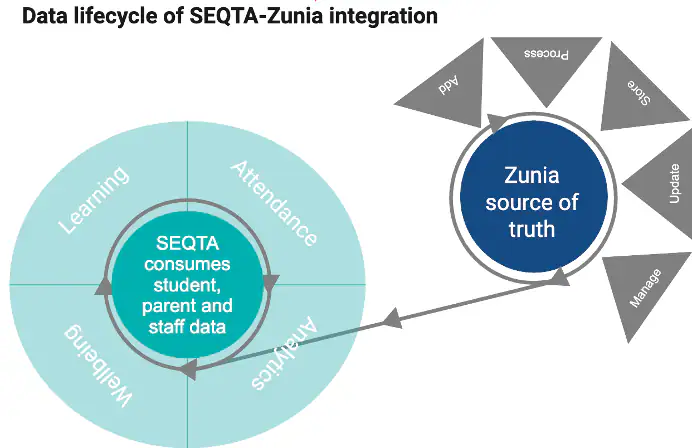
When you create a student, parent or staff profile in Zunia, each person will have a Community ID for life. This covers them throughout their journey as student from the application, enrolment, current student to alumni and parent, staff, etc.
This means any new or update to student, staff or community data must be made in Zunia. Adding or updating any student, staff or community data in SEQTA will be overwritten once the Zunia sync runs.
Important to remember
- Only students, staff and contacts that have surnames in Zunia will be synced in SEQTA.
- Any additions, removals or updates to student, staff or community data must be made in Zunia.
- Any additions, removals or updates to student, staff or community data in SEQTA will be overwritten when the Zunia sync occurs.
Understanding data between SEQTA and Zunia
How do I know which fields are required from Zunia in SEQTA?
Your school's System Administrator will have this mapping documentation. Please refer to them if you would like to access it.
What happens if I update student, staff or community data in SEQTA?
Any student, staff or community data that is added, updated or removed from SEQTA will be overwritten when the sync occurs. Therefore, it is important that these updates are made in Zunia to maintain a single source of truth.
What happens with medical data?
| SEQTA | Zunia |
|---|---|
| View medical alerts | Add medical incidents |
| View medical incidents | |
| Add medical alerts | |
| View medical alerts |
How do I know where to get tasks done across SEQTA-Zunia?
Refer to the Working between SEQTA and Zunia guide to understand which platform you need to complete tasks in and follow the links to guides that take you through the detailed steps to complete your intended tasks.
How do I get help if something isn't working?
Your System Administrator will be able to help you and they will raise a Support ticket if required.
Was this article helpful?
That’s Great!
Thank you for your feedback
Sorry! We couldn't be helpful
Thank you for your feedback
Feedback sent
We appreciate your effort and will try to fix the article