On some occasions the student list for a class might not match up with the teacher's timetable when marking attendances and it may be necessary to force a timetable publish.
These are the steps :
1 -Select Classes and the impacted class
2 - Ensure the student list is correct including Student count and Enrolment dates
Temporarily Archive the class
3 - Select Schedule Classes and the impacted class
4 - Tick the Archive checkbox on any scheduled day and save (this will force a timetable publish)
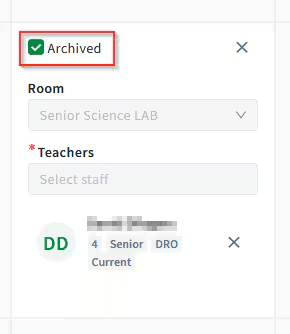
5 - Select Publish timetable and Publish the class (This will temporarily disable the class from the timetable for that day)
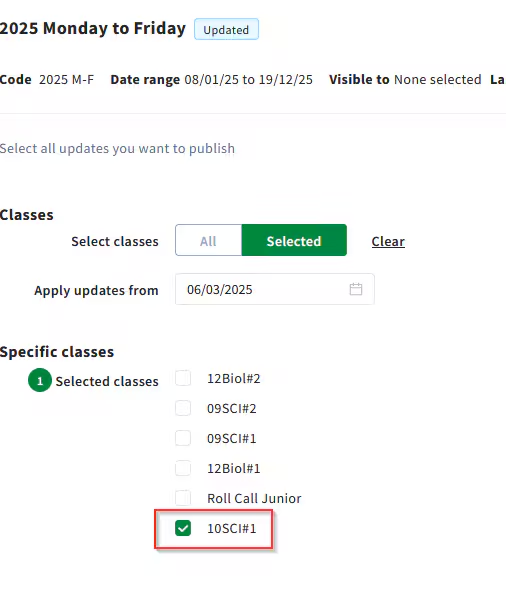
Repeat the above steps to Unarchive the class
6 - Select Schedule Classes and the impacted class
7 - Untick the Archive checkbox on the scheduled day and save (this will again force a timetable publish)
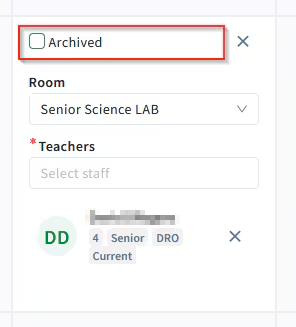
8 - Select Publish timetable and Publish the class (Take note of the Apply Updates from field as you may need to publish past date changes)
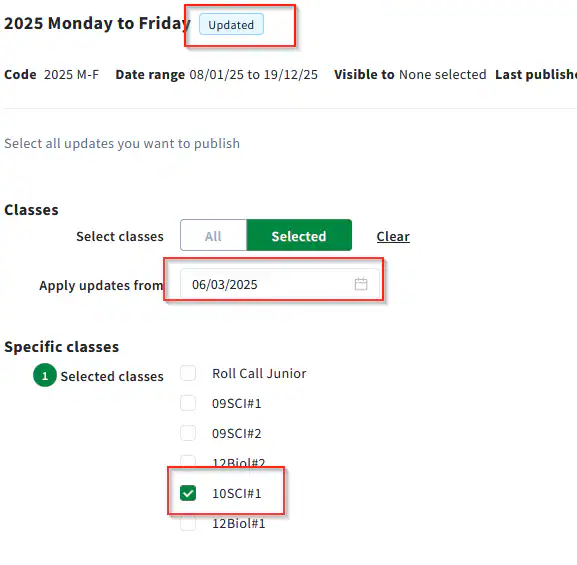
Check the staff timetable. It should now display the correct students when marking attendances
Was this article helpful?
That’s Great!
Thank you for your feedback
Sorry! We couldn't be helpful
Thank you for your feedback
Feedback sent
We appreciate your effort and will try to fix the article